Most readers who enjoy one of your books want to know what else you've written. If the answer is scattered across five stores and an out-of-date website, many will give up. A storefront gathers everything in one place, so every link you share leads somewhere readers can act.
Three ways to build a storefront
| Your own website shop | Creator storefront | Bookstore author page | |
|---|---|---|---|
| Examples | Shopify or a website plugin, with an ebook delivery app | Payhip, Gumroad | BooksOasis author and publisher pages |
| Setup | Most work | Quick | Almost none |
| Cost | Monthly plans, apps, processing | A share of each sale, plus processing | A plan; on BooksOasis, 100% of the ebook price |
| Customer emails | Yours | Yours | Kept by the store |
| Browsing readers | Only those you bring | Mostly those you bring | Those you bring, plus store browsers |
| Print books | Via integrations or your own stock | Usually digital only | Yes, on BooksOasis |
| File delivery | You set it up | Downloads | Handled; ebooks open in a reading app |
What every storefront needs
- Every book, with its cover, a one-line hook, formats and price.
- Series in reading order, with book one clearly marked as the place to start.
- A short bio written for your readers, and a photo, illustration or logo.
- A newsletter sign-up or link, so interested readers can stay in touch.
- Links to your website and the social profiles you actually use.
- An obvious way to buy, with no dead ends.
Your own website shop
A shop on your own site gives you complete control over design, pricing, bundles and special editions, plus your customers' email addresses. The cost is setup and upkeep: a shop platform or plugin, an app to deliver ebook files, payment processing, tax settings and customer support. It suits established authors with a large mailing list who sell enough direct to justify the work. See how to sell ebooks direct.
Creator storefronts
Payhip and Gumroad give you a storefront page in minutes, with automatic file delivery and customer emails. Payhip's free plan takes 5% per sale plus processing; Gumroad takes 10% plus $0.50, and 30% through its marketplace. They suit authors selling ebooks and extras, such as bonus chapters and courses, to their own readers. See Payhip vs Gumroad.
A bookstore author page
An author page on a bookstore is a storefront that needs no building: the store handles checkout, delivery and the reading experience, and your books sit where readers browse. The trade-off is that the store keeps the customer relationship, so use your back matter to invite readers to your newsletter.
BooksOasis author pages as your storefront
Every author profile on BooksOasis gets its own public page at an address you can share. It shows the author's display name, bio, photo, genres and links (website, X, Instagram and Facebook), along with every book published under that name, with covers, formats and prices. Each book links to its own page, where readers can buy the ebook, paperback or hardcover, and every series has a page listing its books in reading order.
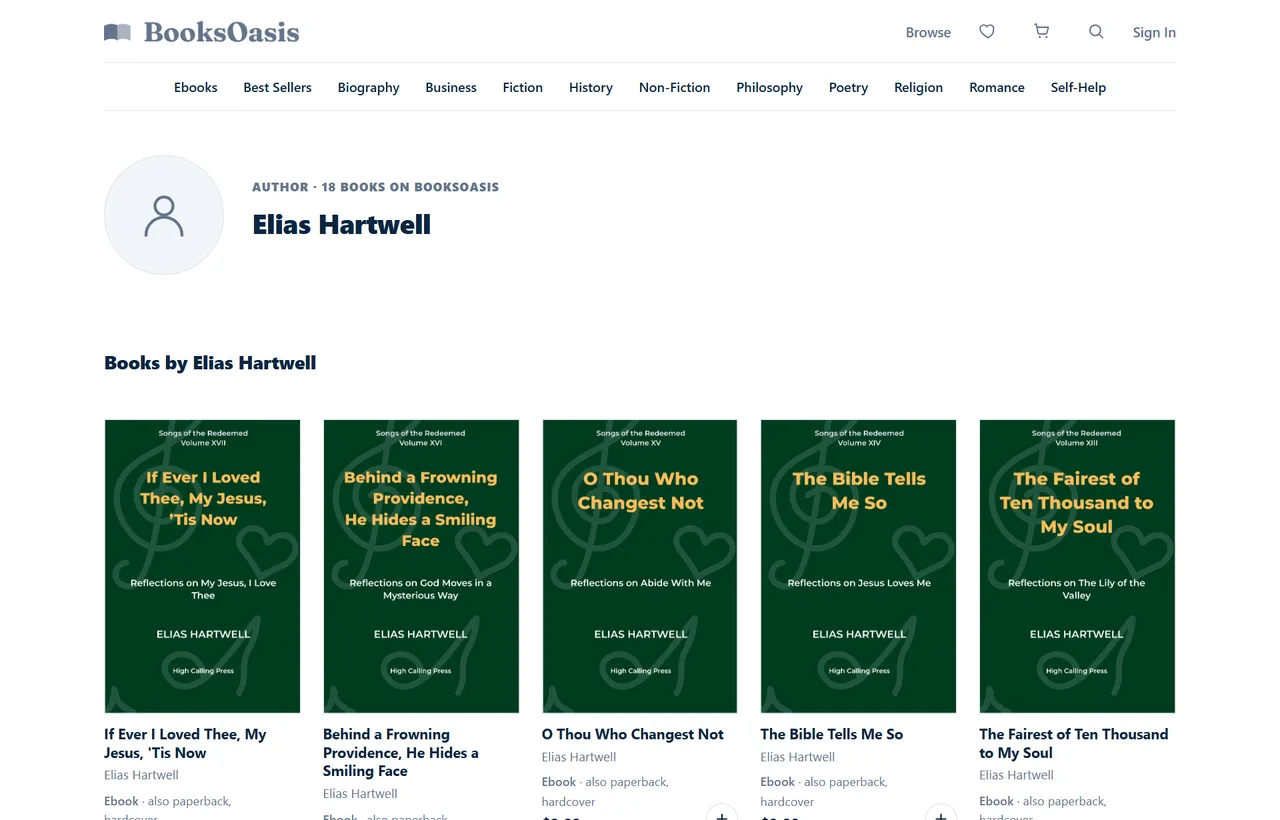
- A page per pen name, listing only that name's books, with no visible link to your other names.
- Publisher pages for imprints, with name, description, logo, website and books.
- Every format for sale: ebook, paperback and hardcover.
- 100% of the ebook price on every sale, for a flat yearly plan.
- Readers browse too: your books also appear on genre shelves, search and series pages.
What BooksOasis does not do
- It doesn't give you buyers' email addresses.
- It isn't on your own domain; link to your author page from your website.
- It sells books only, not courses, memberships or merchandise.
- The plan costs a flat fee whether or not you sell.
Writing your storefront bio
Your bio's job is to make readers of your genre feel they're in the right place. Keep it short (60 to 120 words), write in the third person or first, as suits your voice, and focus on what readers care about: what you write, what it feels like to read, and one or two human details. Save the full life story for your website's About page.
Example: "Clara Hayes writes cozy mysteries set in small coastal towns, where the tea is strong and the secrets are older than the lighthouse. A former librarian, she lives by the sea with two cats who supervise every plot. Start with The Harbour Letters, book one of the Harrow Bay Mysteries."
Illustrative example written for this guide.
Choosing where to start
If you're starting from nothing, begin with the option that takes least time: a bookstore author page. Add a simple one-page website that links to it once you have a few books, and a creator storefront only when you have newsletter extras to sell. Building the full website shop first often delays the thing that matters most, which is writing the next book.
Driving readers to your storefront
- Back matter.Link your storefront at the end of every book, next to the next book's link.
- Newsletter.Link it in every email footer.
- Social profiles.Use it as your single "link in bio".
- Email signature and business cards.Small, but constant.
- Events and interviews.Give one easy-to-say address.
Using more than one storefront
Many authors combine options: a bookstore author page for discovery and hassle-free buying, a creator storefront for newsletter extras, and a website that links to both. The website becomes your home base, the bookstore page your main shop window, and the creator store a place for exclusives. Keep prices consistent across all of them, so no reader feels they paid more for choosing one over another.
A storefront for a small press
If you publish several authors, or your own work under an imprint, a publisher storefront gathers the whole list under one brand. On BooksOasis, a publisher profile has its own page with the imprint's name, description, logo and website, listing every book published under it. Each author on the list still gets their own author page, so readers can follow either the press or the writer.
Photos, logos and branding
- Author photo: a clear, friendly headshot, or an illustration if you write under a pen name and prefer privacy.
- Publisher logo: simple enough to read small, on a plain background.
- Consistent style: the same photo and bio wording across your website, social profiles and store pages, so readers recognise you.
- Genre fit: a thriller writer's page should feel different from a devotional author's, down to the photo and tone.
Measuring what works
Track where readers come from. Use a different link for your newsletter, back matter and social profiles where your tools allow it, or simply note sales around each email or post. After a few months you'll know which channels send readers who buy, and you can put more effort there.
Three authors, three storefronts
A romance author with a big newsletter runs a Payhip store for bonus epilogues and box sets, and links her BooksOasis author page for readers who want every format, including paperbacks.
A historian writing under his own name has no website. He uses his BooksOasis author page as his only link, in his email signature, conference bios and the back of each book, and lets the store handle checkout and print orders.
A small Christian press uses a publisher page for its imprint, listing devotionals from several authors, with each author's own page linked from their books.
Keeping it current
- Add each new book on release day.
- Update series order and "start here" notes as the series grows.
- Refresh your bio and photo every year or two.
- Check every link after changing any store listing.
- Remove or mark books you have taken off sale.
- Ask a friend to click through it once a year, as a new reader would, and note anything confusing.
Common mistakes
- No clear starting point for readers new to a series.
- A bio about your career instead of your books.
- Dead links to old editions or closed stores.
- Several different links shared in different places, splitting attention.
- Mixing pen names on one page when you meant to keep them separate.
Sources
Checked September 2026: BooksOasis: authors and publisher profiles; BooksOasis: managing multiple pen names; Payhip pricing; Gumroad pricing.
In short
A storefront turns scattered listings into one place readers can act. Build your own shop if you want full control and sell enough direct, use a creator storefront for quick digital sales, or use a bookstore author page for a ready-made shop window with browsing readers. Include every book, a clear starting point and a newsletter link, and share that one link everywhere.
Questions
What is an author storefront?
A single place where readers can see and buy all your books: your own website shop, a creator storefront, or an author page on a bookstore.
Do I need a website to have a storefront?
No. A bookstore author page gives you a shareable page listing every book, with no website to build. Many authors use one alongside a simple website.
What should an author storefront include?
Every book with its cover, formats and price, clear reading order for series, a short bio and photo or logo, links to your newsletter and social profiles, and an easy way to buy.
Which is better: my own shop or a bookstore page?
Your own shop gives you control and customer emails but needs setup, payments and file delivery. A bookstore page needs almost no setup and puts you in front of browsing readers, but the store keeps the customer relationship. Many authors use both.
How do I get readers to my storefront?
Link it from your book's back matter, newsletter, email signature, website and social profiles, and use it as your single link wherever you're asked for one.
Can each pen name have its own storefront?
Yes. On BooksOasis, every author profile gets its own public page listing only its books, with no visible link to your other names.
What's on a BooksOasis author page?
The author's display name, bio, photo, genres and links (website and social profiles), plus every book published under that name with covers, formats and prices.
Do imprints get a storefront too?
Yes. A BooksOasis publisher profile has its own page with the imprint's name, description, logo, website and books.
Can readers buy print books from my storefront?
On BooksOasis, yes: ebooks, paperbacks and hardcovers can all be bought from the book pages linked from your author page.
How much does a BooksOasis storefront cost?
Author pages come with every plan. Plans start at $29.99 a year for 10 books, and you keep 100% of your ebook price.
How long should my author bio be?
Usually 60 to 120 words for a storefront. Focus on what you write and what it's like to read, with a human detail or two, and keep the full story for your website.
Should I use a photo on a pen-name storefront?
Only if you're comfortable with it. Many pen names use an illustration, a logo or no image at all, which is perfectly common.
How do I know which links bring buyers?
Use different links for your newsletter, back matter and social profiles where your tools allow, or note sales around each email or post, and compare over a few months.
Get a storefront for every pen name
Each author profile on BooksOasis gets its own page listing all its books.