Building an author website takes time, money and upkeep: design, hosting, payments, file delivery, security updates. For many authors, especially early on, it is a distraction from writing. The good news is that the jobs a website does can be done without one. This guide shows how.
What an author website normally does
Before replacing a website, list its jobs. For most authors, a website does five things:
- Shows readers all your books in one place.
- Lets readers buy, or sends them to where they can.
- Collects newsletter sign-ups.
- Tells readers who you are.
- Gives you one link to share everywhere.
Each of these can be covered without building a site.
Job 1 and 2: show and sell your books
An author page in a bookstore shows every book you have published under that name, with covers, prices and buy buttons. On BooksOasis, each author name has a page like this, and each publisher or imprint has one too.
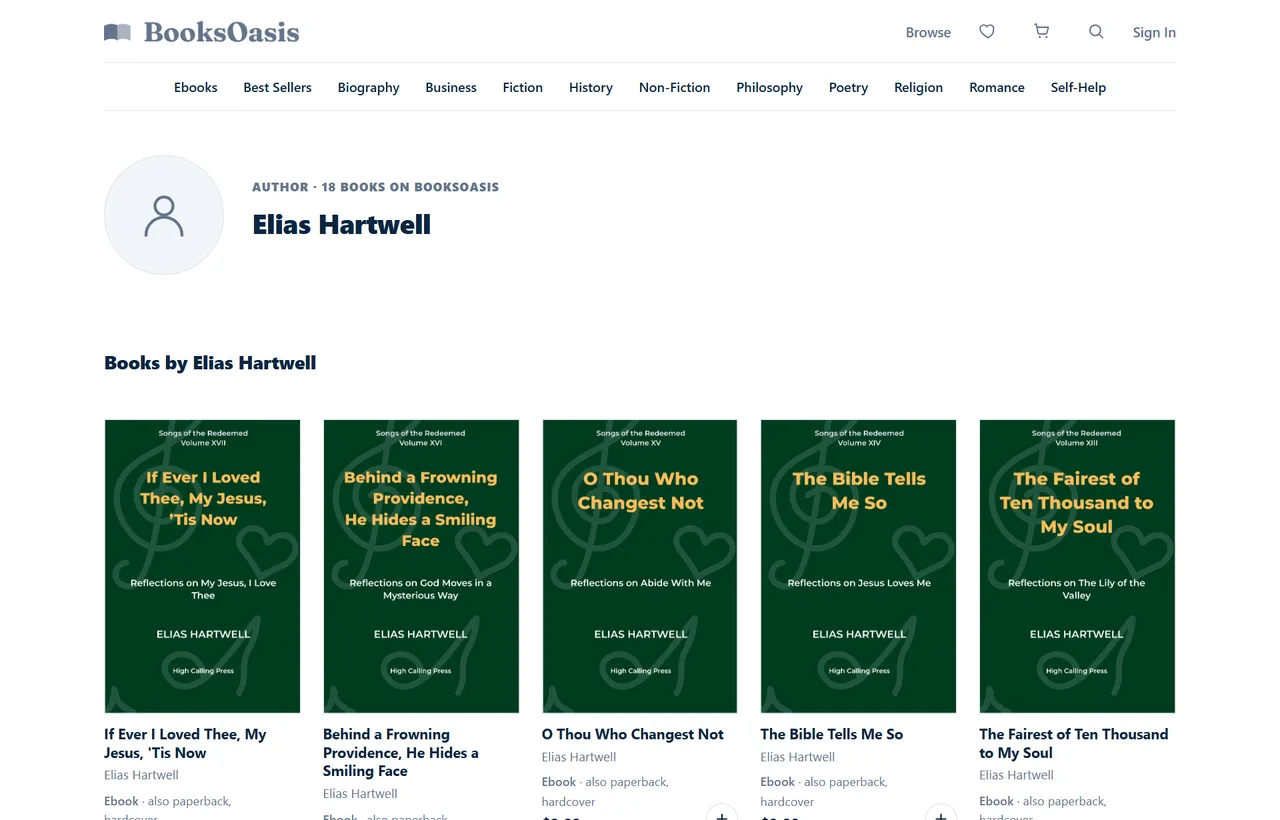
- Readers can buy ebooks, paperbacks and hardcovers from each book's page.
- Ebooks open instantly in Oasis Reader, so you never deliver files.
- Series have their own pages, where readers can buy the first books or the whole series.
- Prices show your promotions, with the regular price struck through.
Your retail listings (Amazon, Apple, Kobo) also serve this job, but each only shows the books you publish there, and each keeps around 30% of ebook sales.
Job 3: collect newsletter sign-ups
Every major email service provides a hosted sign-up page with its own link. You don't need a website to use it.
- Choose an email service.Many have free plans for small lists.
- Create a sign-up pagewith a short promise: what readers get and how often.
- Offer a reader magnet.A free short story, novella or bonus chapter gives people a reason to join.
- Link to it everywhere, especially at the end of every book.
Job 4: tell readers who you are
Readers want a short, human introduction. Use the author bio fields on each platform, keep one consistent bio and photo, and include your newsletter link. Your social media profiles and your email service's sign-up page can carry the same bio.
Job 5: one link to share everywhere
A link-in-bio page (from any of the many free link-page services) gives you one short link listing everything: your author page, retail links, newsletter sign-up and social profiles. Put that link in your social profiles, email signature and printed materials.
Make the first button the one that pays you most, such as your author page on a full-margin store, and put retailers underneath.
Writing an author bio that sells
Without a website's About page, your bio does more work. A good one is short, specific and reader-focused:
- Lead with what you write, not your life story: "writes cosy mysteries set in coastal Maine."
- Add one or two human details readers can connect with.
- Mention credibility only if relevant: expertise for non-fiction, awards, or number of books.
- End with an invitation, such as joining your newsletter.
Keep a 50-word and a 150-word version, and use them consistently everywhere.
Back matter: your most valuable page
The last pages of your book reach readers at their most engaged moment. Without a website, back matter is your main sales page. Include:
- A short thank-you and a request for a review.
- The next book in the series, with a direct link.
- Your other books, grouped by series.
- Your newsletter invitation and reader magnet.
- Your one link-in-bio address, for everything else.
QR codes for print books and events
Print readers can't click. A QR code on your back page, bookmarks, flyers and event table sends them to your link page or author page in one scan. Most link-page services generate QR codes for free. Test the code with two different phones before printing.
A no-website setup, at a glance
| Job | Tool | Cost |
|---|---|---|
| Show and sell your books | BooksOasis author page, plus retail listings | From $29.99 a year on BooksOasis; retailers keep a share |
| Newsletter | An email service's hosted sign-up page | Often free for small lists |
| About you | Author bio on each platform | Free |
| One link | A link-in-bio page | Often free |
Other ways to sell without a website
Direct platforms
Books.by gives you a branded bookstore for a yearly fee; Payhip and Gumroad give you a simple shop for a percentage of each sale. They work without a website, though you drive all the traffic. See Books.by alternatives.
Retailer author pages
Amazon's Author Central and similar tools on other stores let you create an author profile listing your books there. Useful, but tied to that store.
In person
Book fairs, markets, talks and signings sell print copies directly. A card reader and a sign with your link-in-bio QR code are all you need.
Social commerce
Some authors sell through social platforms' shop features or by linking directly from posts. Keep one destination link so readers aren't confused.
Pros and cons of skipping the website
| Pros | Cons |
|---|---|
| No design, hosting or maintenance | Less control over branding and layout |
| No payment or file delivery to set up | Some platforms don't share buyer emails |
| Live in an afternoon | Your presence depends on other platforms' rules |
| Low or no cost | Harder to run advanced marketing and tracking |
When a website becomes worth it
- You have several books or series and want to present them your way.
- Your newsletter is growing and you want dedicated landing pages.
- You run ads and need detailed tracking.
- You want to sell merchandise, signed copies or special editions.
Even then, many authors keep their bookstore author page and link to it from the website, so readers can buy with a familiar checkout.
Setting it all up in an afternoon
- List your bookson BooksOasis (and retailers, if you haven't), with good covers, descriptions and categories.
- Check your author pageto make sure every book appears under the right name.
- Create a newsletter sign-up pagewith a reader magnet.
- Build a link-in-bio pagewith your author page first, then retailers and newsletter.
- Update your social profilesand the back matter of your books with the new links.
- Buy your own book onceto test the reader's experience end to end.
A weekly routine that replaces a website
A website works while you sleep, but so can this simple routine, in about an hour a week:
| Day | Task | Time |
|---|---|---|
| Monday | Check sales and reviews across your stores | 10 minutes |
| Tuesday | Share one post about a book, with your one link | 10 minutes |
| Thursday | Write or schedule your newsletter | 30 minutes |
| Friday | Update prices or promotions if needed | 10 minutes |
Keeping readers' trust
Readers buy from authors they trust. Without a website, trust comes from consistency: the same name and photo everywhere, honest descriptions, clear prices, and books that are easy to buy and read. A reputable store with a clear refund policy and a smooth reading experience does much of this work for you.
Pen names and imprints without a website
If you write under more than one name, a website per pen name multiplies the work. On BooksOasis, a subscribed account can create unlimited author names and imprints, each with its own page, and readers only see the public identity you choose. See publishing under a pen name.
Your bookstore presence on BooksOasis
- An author page for every pen name, and a publisher page for every imprint.
- Checkout, delivery and reading handled; 100% of every ebook sale is yours.
- Ebook, paperback and hardcover on one listing; series pages for whole series.
What it doesn't do: BooksOasis doesn't share buyer email addresses, so keep your own newsletter sign-up. Every book passes a short moderation review.
See plans and pricingAn example setup
Imagine a debut fantasy author with a three-book series. Her setup, done in one afternoon:
- The series listed on BooksOasis and Amazon, with a series page on BooksOasis for readers who want all three.
- A free prequel novella offered through her email service's sign-up page.
- A link-in-bio page: "Buy the series" (her BooksOasis series page) first, then Amazon, then "Get the free prequel".
- Back matter in every book pointing to the next book and the free prequel.
She has no website yet, and every job a website would do is covered.
Common mistakes
- Too many links. A link page with twenty buttons confuses readers; keep it to the essentials.
- No newsletter. Without one, readers who love your book have no way to hear about the next.
- Inconsistent names and bios. Use the same author name, photo and bio everywhere.
- Forgetting back matter. The end of your book is your most valuable page; put your links there.
In short
A website is nice to have, not a requirement. An author page in a bookstore handles showing and selling your books, a hosted sign-up page builds your newsletter, and a link-in-bio page gives you one link to share. Set it up in an afternoon, then spend the time you saved writing your next book.
Questions
Can I sell books without a website?
Yes. Retailer listings, an author page in a bookstore, a direct platform store and a link-in-bio page can do everything a website does for most authors.
What is the best alternative to an author website?
An author page in a bookstore where readers can buy all your books in one place, plus a simple link page for social media and a newsletter sign-up.
Do I need a website for a newsletter?
No. Email services provide a hosted sign-up page you can link to from your books, social profiles and author page.
Does BooksOasis give me an author page?
Yes. Every author name gets an author page listing their books, and publishers get a publisher page. You can create unlimited author names and imprints on a subscribed account.
When should I build a website?
When you have several books, an active newsletter and want full control over your brand and reader data. Many authors start without one and add it later.
How do readers pay if I don't have a website?
Through the store where your book is listed. On BooksOasis, readers pay at the store's checkout and the ebook appears in their library straight away.
Can I sell signed copies without a website?
Yes, at events or by arranging orders through your newsletter. For online orders of standard print copies, a bookstore listing with print on demand is simpler.
Is a Facebook page enough instead of a website?
It helps, but social platforms control who sees your posts. Pair it with a newsletter and a bookstore author page, so you aren't dependent on one platform.
Can I link my BooksOasis author page from Instagram or TikTok?
Yes. Add it to your link-in-bio page, or link it directly in your profile, so followers can see and buy all your books in one place.
How much does it cost to sell books without a website?
Very little. A BooksOasis plan starts at 9.99 a year for 10 books, many email services are free for small lists, and link-in-bio pages are often free.
Will readers trust a bookstore page instead of my own site?
Usually more, not less. Many readers prefer buying from an established store with a familiar checkout and refund policy.
Can I add a website later?
Yes. Many authors start with a bookstore author page and link page, then build a website once they have several books, keeping the author page as a place to buy.
Get an author page in minutes
List on BooksOasis: your books, your author page, 100% of ebook sales.